Showing posts with label thimble. Show all posts

Tuesday, January 22, 2013

Make - First Interaction Design

 On the Webmaker community call and on his blog this week, Brett Gaylor presented that we are currently aiming to solve several key design questions for Webmaker. You can read about the challenges and solutions here.

In an effort to move Webmaker into a space where from the moment you come to the site - you are encouraged to make something (what Brett is calling "make - first" interaction design) , I am going to show some prototypes that I have been working on. 

You can see all of them here in larger, more legible form.

Even though the fidelity of my prototypes might seem more polished then usual, as always please note that these are mockups and prototypes designed for the purpose of iteration, so please give me feedback and ideas for things that I should consider when moving forward with the design. 

landingpage-wire-annotated

First, lets take a look at the Landing page. The idea here is that from the moment that you land on Webmaker.org you are given the call to action to tinker and interact with content in a very real way. What you are looking at is actually a meta "Animated webpage" project that is comprised of several types of projects - so in essence the content type becomes a gallery. The page is instantly hackable and as the user, starts tinkering with an x-ray goggle like interaction- they can choose to deep dive and reveal the more advanced editing tools. While this is a mockup for the landing page - you could imagine that it is also a prototype for how a user might be able to pull and view content from the gallery - so the user gets the opportunity to digest a project first as consumable content and then engage with it as a hackable medium. This kind of interaction was deeply inspired by my reading of the work of Mimi Ito - particularly in her book Hanging Out, Messing Around and Geeking Out. Here is what it might look like with some timely content.

The next mockup is a first iteration of what a gallery could look like for us. A user does not have to be logged in to view the gallery, but if they are they will have a more personalized lens as well as the chance to engage with the content creators. 


In this mockup (which admittedly is the most nascent) you see a view of what a user might see if they are clicking on a particular users name - it's a filter of the content that the user made public. This could include their projects, badges or assets. Ideally this page will have some level of hackability - a la MySpace - so maybe the CSS of the page could eventually be modified by the individual users - since in essence this becomes a bit of a portfolio page. To be clear, I'm not saying it should look or feel like MySpace - but there was a certain level or ownership and creativity around that kind of personalization.

Finally, I'd like to share with you the prototype that I hacked up with Atul yesterday. It's a prototype, so you know don't tweet far and wide - but you can check it out to start to see what it would be like to have hackable content on a landing page and remember to click "D" for deep dive to bring that content directly into Thimble. 

Wednesday, December 19, 2012

Evolving Webmaker in 2013


"Allow events to change you. You have to be willing to grow. Growth is different from something that happens to you. You produce it. You live it. The prerequisites for growth: the openness to experience events and the willingness to be changed by them." - Bruce Mau from Incomplete Manifesto for Growth

2012 was a full year for us at the Mozilla Foundation - we released Thimble, a universal navigation MVP, soft launched badges, refined and launched Popcorn 1.0 and became an active voice for Web Literacy values in the community. So where does that leave us for 2013? As Bruce Mau's beautiful sentiment here reflects, now is the time for us to live in the moment and to be strong enough to allow ourselves to be changed or affected - by users, by people who do unexpectedly amazing things with our tools, and by people who are standing next to us in the crowd and trying to get their own voice heard.

2013 is full of a lot of opportunity.  For Webmaker that means evolving our design to be a real - world learning experience. By that, I mean that we need to focus on collaborative webmaking.  At our hack jams, community calls and festivals we have seen the value and success of peer to peer learning and we need to leverage the experiences of those events and have them inform our design.

We have laid the ground work for this in 2012 by introducing badges into our ecosystem. Badges are naturally equated with skills, however they need to have a level of social value in an ecosystem to have any meaning.  That's the problem- badges for the sake of badges leave you feeling pretty flat, so you need the entire ecosystem to live and breathe as a social, collaborative environment where you have supportive peers who are invested in the skills, but also - importantly - what it takes to earn those skills. That's our mission: create an environment where making = learning. Concretely that means that our website is going to shift from a site to a platform and our suite of tools are going to evolve into a more unified experience.

Over the past few weeks, a bunch of us on the Webmaker team took some time to do the blue sky thinking that needs to happen to take a design concept to the next level. We came up with some ideas and prototypes and I am going to share a few here.  Each prototype represents a concept that we want to explore in the New Year.


1. Your Creative Cloud - We want to make it easy to collect, share and remix content from your world - and this means everywhere that you are going- whether that be collecting content from your mobile device or browser and adding that directly to a project to remix on Webmaker . Maybe in the future that means remixing Webmaker content that you have clipped or saved from your cloud on to some sort of media clipping gallery -- remixing that on the web in a more distributed manner.  Click here to see the enlarged mockup. 
 
We feel that this is one area that Mozilla can lead as we are uniquely suited to be effective here because of the precedent of bookmarking in browser in Firefox as well as with our work directly around identity in conjunction with Persona. To be clear, we don't need or want to lock you in to a uniquely browser based experience - but the opportunities for this association and leveraging of the Mozilla brand and design values are quite large. We know this is a win for us, because our colleagues over at Firefox are in- line with our thinking and we are starting discuss opportunities for us to collaborate on this piece of the puzzle.


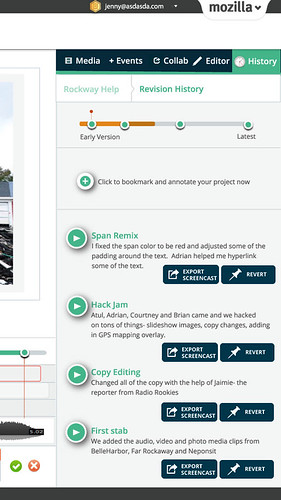
revisionhistory


2. Collaboration as learning is a big theme for us, not just in the mockup I am showing but it is going to be a consistent and fluid theme within our tools and platform.  In the mockup above you are looking at system for using to revision history as a way to document process. Here, just like in etherpad, you are able to record your Webmaking sessions and replay them at different points in your timeline. You can see the work that you have done and how you constructed a project,  as well as how a peer who is helping to hack your project made the changes that she did. This allows for asymmetrical as well as symetrical collaboration experiences.
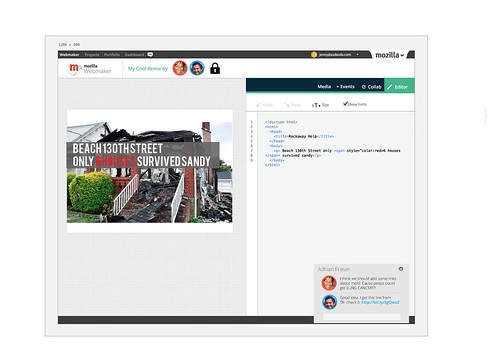
webmakernew-adveditor

3. Making our tools speak the same language. We are trying to make the experience for an average user easier- this means putting some controls in place so that the user starts to recognize conventions and see how the Webmaker properties relate to eachother.  As you can see in this mockup, I am starting to experiment with building a more unified experience- which includes: having a unified (and single) login for Webmaker, building out common terminology, controls and User Interface - and incorporating the tools into the same experience. To be clear- this does not mean that Thimble goes away, it just means that we figure out a way for our tools to speak more clearly to the end user.
 

4.  Creating opportunitites for Community of Craft - working with peers and mentors to build the web in a social, real way. I demo-ed this prototype at the Webmaker community call and Bobby Richter helped me present it:
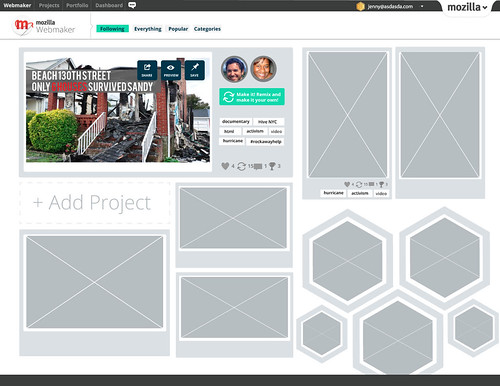
gallery-following

Imagine that you logged into webmaker.org and landed on the above gallery page.The view that you are looking at- is as if you have followed several other Webmaker users who have posted projects that they made as well as "themes" that you might have followed- for example- video projects or projects about activism. Any of these projects are remixable. You also are seeing badge graphics which, when you click on them, open up to a sub-gallery of sets of projects connected to various skills. For the moment, imagine that you are Secretrobotron going on to this page, you see a cool project by your friend and you click the green remix button which opens it directly in the editor. 


These are examples of some of the things that we have been thinking about. And this is exactly how we want to be working--- putting out crazy ideas, testing them out, seeing what sticks and iterating. Shout outs to Chris, Kate, Bobby, Atul , Brett, Chris, Erin and everyone who has been on Webmaker community calls in 2013. As I said earlier, this is an evolution of our thinking so all these ideas came out of lots of ground work, user testing , hive pop ups and festivals.

That last prototype was built in a period of 48 hours by Bobby, myself and Chris Appleton- so if all it takes is 48 hours to get some collaborative Webmaking action - imagine what we can make happen in 2013!


Reference: Check out this great post by Bobby on the prototype implementation.


Wednesday, October 3, 2012

Designing the Platform to Teach the Next Generation of Webmakers

Mark wrote about vision, then Erin wrote about product definition, and then Chris wrote about the engineering and so now, I will give you the fourth chapter in the Webmaker epic: how we are designing Webmaker.

Several weeks back I gave a lightning talk at the Mozilla all hands in Toronto on this very topic. Here is a screencast of that (slowed down to human speed- so it's longer than 3 minutes)


Concretely, what does this mean we are doing?

1. Evolve the brochure site into a platform
By evolving the architecture of Webmaker to be focused on the maker (learner) we will shift from a brochure site into a platfrom. We will be designing an experience for a user who is coming to Webmaker to make something. At Mozilla we are super successful at activating users to take action at physical events and meetups like MozFest - we want to harness that grassroots spirit and concretely mobilize users to feel empowered to come to Webmaker and make things. This will mean right from the start giving the user simple calls to action to make, meet and learn.


Above is a sketch of what the future webmaker.org could look like.
The focus will be on things that you can make and users will be able to open projects within or be directed to the appropriate tool to make that project.


2. Unify the user experience
In order to evolve the site we are going to focus on unifying the Webmaker user experience and interface. This means:
  • designing a unified login
  • establishing common terminology, controls and user interface
  • incorporating the tools into the same experience
  • designing learning pathways that could span multiple tools and projects
  • defining calls to action focused on making something
  • creating opportunities for self organizing and personalized curation of learning
  • empowering the user by giving them the ability to set goals, receive data and feedback on their making and learning activities
  • evolving the branding so that the language and visual vocabulary focus on making


One aspect of this will be implementing a universal navigation (wireframed above- click to see more exploratory images). This is a navigation that we will be implemented across all properties in Webmaker, and allow the user at any given moment to tap in to their projects, learning dashboard and community. At first we will be implementing a version of this in Thimble and as we iterate, we will roll it out across Webmaker- apps and web properties. The idea is that it will be a personalized navigation- so it will speak to your unique Webmaker experience.

 interactive filter (sketch)

projects based on your interests

When you log in to Webmaker through Persona, you will be able to access a dynamically generated set of projects that are catered to your specific interests - through some kind of interactive filter. In conjunction with the projects, the personalization will extend throughout the site - you will see events in your region, people who have similar interest, skills that you can improve upon etc. Some of the specifics of this are still being brainstormed by our Learning and Engineering teams, however this is just a rough sketch of what will be possible in the future.

3. Design with learners, iterate, release- rinse- repeat.
Our m.o. here is to design not just a user experience- but a learning experience. We will be designing with learners and those hacktivators who are in the position to teach or empower learners so that we are constantly testing, iterating and improving our product.  We have a fantastic community of learners and hacktivators in the Hive - in New York, London, Berlin, and beyond. Additionally we have a large extended community of individuals passionate about contributing to an open source and open educational resource project. We are going to work with this community as a lab- where we can launch early and often, user test and develop this platform out to be a tool that they will use.


There's a lot of work described here and we aren't going to being rolling it out all at once. Our next major milestone will be in November. We are going to be releasing a bunch of half baked and fully baked ideas at the Mozilla Festival. It is a great chance for us to user test concepts, incubate ideas and elevate great ideas into our products.  It's going to be a fantastic few days where our designers will be out in the field doing what we do best- making stuff in the open, with passionate community members. To continue to be part of the conversation, please join the Webmaker mailing list or come to our weekly calls.

Thursday, August 9, 2012

Badges, Assessment and Webmaker+

I am going to talk to you about some of my thinking around badges, assessment and the often talked about, but never before explained concept of Webmaker+.  

When we talk about the tools and resources that we are building at Mozilla we often contextualize them as learning experiences. So, for example, you might go to Webmaker.org - find a project- make and publish that project and along the way gain some basic HTML skills. However, in our current model, you could very well walk away after publishing your project and have no realization that you just learned something. And- because of that, you might not be able to level up your tinkering to craftsmenship.  Check out the vidcast to hear more:


(and based on the unexpected fanclub I've gained from my singing on the last vidcast, I have some special singing action here for you today)


In the vidcast, I showed 4 wireframe iterations for incorporating badges and embedded assessment into Thimble.

Iteration #1:


greenbadge
I started to imagine the badges appearing as you accomplish various things, taking a cue from the Cheevos system. It would look something like this ^^ Cons: the badge is super intrusive and could be distruptive to the learners experience. Pros: the actual "ingredients" displayed in the badge

Iteration #2:


orangebadge-2

Imagine the orange tab subtly popping up almost as if it is coming out of the toolbar. You then have the ability to transition to the next slide where you can add the badge to your backpack and share via social media. But is this too subtle?

Iteration #3


badge icon in toolbar wiggle when you receive badges (nothing pops up till you click it)


on click, you can see your badges- so if you have earned 4 badges- it will appear as a slide show 


yellowbadge-2

Iteration #4: Webmaker +

pinkbadge-1
pinkbadge-2

pinkbadge-3

As you see here, we could add a nav bar that gives a user the ability to opt in to the community, once they join, they are essentially signing in to be part of the game. It then becomes almost like an exclusive layer that sits on top of the software- which by the way could be thimble and popcorn but also community designed tools. The badge here could actually reflect data that is unique to the user. So for example, if they indicated that they were trying to achieve the goal of learning HTML and earning the uber HTML basics badge, then the badge could reflect that progress as well.

Extra Iteration:

dashboard
With Webmaker+, the badge backpack gets transformed into a user dashboard, where they could see their progress, but also control it- so they can set goals, join challenges, and add badges. 

This is an initial brainstorm. To get a better understand of what we are thinking about specifically at Mozilla in relationship to the badges that we issue, head over to Chloe Varelidi's blog ( Chloe, did the map I featured in the video). We have been talking about this webmaker+ layer for quite a while and have been letting the ideas percolate. 

In terms of feedback, I would love to hear from your thoughts, but specifically:

1.  If we were to implement the pink iteration (webmaker +) would the "dashboard" (last image above)  be something that lives uniquely on the webmaker site and leverages the Mozilla webmaker community, or would it be a more open ended tool that anyone, anywhere could tap into that gets featured and promoted through the Mozilla Webmaker site?

2.If you had the ability to curate your online learning and making - what kinds of stats would want to track?

Tuesday, July 31, 2012

Productionalize, Maybe

This blogpost is brought to you by myself + Atul Varma.

This week, I am working to streamline the process for contribution to webmaker Projects. Currently, that means fixing the process so it works internally, and then setting the stage for larger community involvement. I  pulled together some of my thoughts on the current process and a strawman to get things rolling in the vidcast below.

(WARNING: there is some Jess Klein singing action goin' on)


Note: I made Chloe look less skilled than she actually is for the purpose of highlighting some flaws in our current process.  Chloe is an uber talented designer and educator, and as I have said many times- there is so much more to the design process than code (ideation, asset creation, designing learning experiences etc.)!

So while making the vidcast, Atul and I talked about the areas of concern and he came up with an interesting solution prototype. Essentially, he took the idea of the form and put it INSIDE the actual project (this is using Thimble as an example). So check it out:


Here is a popcorn project "diy recipe" being made, using Thimble- although this process could be used to make any kind of project (Thimble and Popcorn included). The difference is that if it's a Thimble project, the project page needs to link to the Thimble project... because the project page contains the metadata for the Thimble project. If you take on look on the left panel, you are coding in all of the form fields.... which you then click publish and get: 


You see? It's a thimble page, crazy. Obviously- a bunch more work needs to go into this and we still need to resolve the majority of the questions that my vidcast posed, but I think that it's starting to get us moving into a good direction with some creative solutions.

Monday, July 23, 2012

Building the Next Generation of Web- Craftsmen

I was reading this article this morning in the NY Times by Louis Uchitelle about the American workforce and how we are losing our value of craftsmanship, and it got me thinking about the word "craft." 

Photo by Michael Falco of the NYTimes

We are at a stage where we are building up the contents of our "toolbox" at Mozilla, figuring out ways to sharpen those tools. We have Popcorn, X-Ray Goggles and Thimble- as well as learning projects that can accompany those tools within the context of the tool or in the form of a D.I.Y. recipe.  I am wondering, however, in the long run- how are we going to turn web-hobbyists into web-craftsmen (women, girls and boys)?  We are designing badge systems and trajectories, for our learning content at Mozilla,  which will reveal to our users pathways for further exploration, but in project based learning, I wonder what that extra secret ingredient is that will empower someone to go above and beyond and refine their work to the point that it is a craft.


Implicit in the word craft is some understanding of design, whether that be design of the system, the tool or the concept. In fact, the American Craft Museum (my former employer) has now changed their name to the Museum of Arts & Design. To some degree, the name change was because the term "craft" has lost its relevance in our society- people think of old women crochetting doilies when they hear craft. However, more and more I hear people reclaiming the word and using it as a brand advantage- something that was made by hand. The Renegade Craft Fair,  encourage local artisans to connect with eachother and show (and sell) their wares. Two key takeaways that I have from being a participant in their events is 1) a emphasis on hand- made design and 2) a celebration of community. I believe, these might be the two ingredients required for craftsmenship.

Do not call Atul Varma a codemonkey!


Design is a concept that extends far beyond "coding" when we talk about it in the context of webmaking. When someone creates a webpage, for example, a lot more goes into it than just implementing it- there is the concepting phase- where you brainstorm and make decisions on what and why of your page, the asset creation stage and finally the implementation stage.  It's the big picture.  The developers who I work with at Mozilla understand this. In fact, Atul, my thought partner at Mozilla, and co-developer of Hackasaurus hates it when people refer to him as a "code monkey" (someone who only inputs code)- and while I would only ever say that expression in jest,  the reason he gets so offended is that he is a craftsman. He researches, he tinkers, he looks for a community and ultimately, shares his work within that community. In short, he designs, develops and contributes to a community.

Learn about how much character (get it?) is inside your browser!

In the article, the author mentions how people know how to use their computers but they don't know how to build them- which got me starting to think about what the appropriate analogy is for the work that we do- because yes I could force teens to take apart their computers - but I think that doesn't resonate in the same way that it did for us in the 80s/90s. I think that the canvas for today is not the computer, but the browser- and I feel that deconstructing that browser will help learners understand what is possible- and why it is important to refine your craft to the point that your work is not just digestible data, but beautiful content that is accessible. Atul and I started to dabble with this idea using the Navigator badge concept- but I would love to push that further, and not think about the assessment, but the lessons here.


Hive NYC has developed a community of practice amongst professionals and learners

The community piece is a bit tricky because there are so many ways for us to engage communities. One way, is to build communities of practice with professionals and youth at like minded organizations- which is what we are doing with Hive NYC at Mozilla.  Another way would be to meet youth where they already are, which is kind of the beauty of modular concepts like Open Badges- because it wouldn't matter what circle a learner is based in, because they would be able to show their skill through an understood social currency that is backed up by a portfolio of work. Then again, there are other ways, like imagine mixing the making piece within the context of a community of online practice- like hacking facebook to be the best facebook within facebook- with your facebook peers (oh yeah, that sounded like Inception!)

I often say that the web is a handcrafted community and medium- one that was created by individual people who work to make it reflect of our own local interests. If we are to elevate the level of innovation and representation within the web, we need to develop a community of web- craftsmen. That means providing tangible learning tools and projects, trajectories that implicitly incorporate design thinking and integrating with communities of practice. 

Saturday, June 23, 2012

Inspiration, History and a Challenge

Today kicks off Mozilla's Summer Code Party, and coincidentally, also would have been Alan Turing's 100th birthday. io9 wrote a nice piece on Remembering Alan Turing and the BBC has produced a series of essays that memorialize him as a hero, intellectual and innovator. Turing helped to pioneer key concepts that not only changed the face of Computer Science as a field, but to some extent invent it. He is known for formalizing the concept of an algorithm as well as creating the "Turing Machine" which is seen as a pre-cursor to the modern day computer.


What is an algorithm? Essentially, an algorithm is like a recipe- a step by step method in the form of a list that helps you to perform some kind of function. Algorithms are crucial to the way that computers process data. This is because to be successful in remixing content using a computer, you need to rely on systems thinking. I know, more jargon, but hear me out- systems thinking is how things influence one another in relationship to the whole or the "big picture". So, for example, when you are building your first webpage- as many people will be doing today in conjunction with the Summer Code Party, while at first you might focus on the single thing that you want a webpage to say, sooner or later you are going to realize that a webpage is not about one asset, but about how all of the different components connect to one another within the page, within the system of pages and within the larger world wide web.
Make your first web page with the Thimble 

While much of Turing's history is entwined with the history of war and of our country, his history is also crucial to the history of our internet and the way that we go about not just computing but learning about computation. Just like the concept of the algorithm, Turing's contributions did not just affect the field of computer science, but it changed the way that we think of science as well as how the everyman relates to data. As we take some time this summer to take courses or just appeal to the local geek for tech support, or maybe go to webmaker.org to improve our various skills and web literacy, I challenge us to learn a bit about our history and how we got to where we are with computing.


This is the branding for the Mozilla Summer Code Party- pretty fantastic, right? Get together, make something and learn while you are doing it.


When you say that you work within the Technology or Internet field, people assume that you are working on something that is "state of the art" or brand new, which frankly, is true to some extent because due to the very definition of how the web is created- you are making something. You are not just a consumer of another persons work. However, what we are doing is building upon one anothers work, and I mean that in a very literal sense- in that we are hacking templates and remixing snippets of code. However, we are also being inspired by one another and the history of makers and innovators that have come out and created the field. So take a second, and learn about historical figures and designers- who masterminded the blueprint for how we navigate the world and communicate with one another. Perhaps you will be inspired, or maybe just motivated enough to make your own small mark on the web.

Here are some resources:

Alan Turing, on the BBC
Mozilla Webmakers site
NYTimes Technology section
The Computer History Museum

There are so so so many more, if you have a resource, please share.

Sunday, May 20, 2012

Revised UI/UX for the app formerly known as Webpage Maker

Over the past couple of weeks we have been user testing the Webpage Maker tool as well as some of the learning projects associated directly with it. As a result of this, I see that there are several touchpoints within the interface as well as the overall user experience that need to be modified. I pulled together my thoughts and revised mockups (created by myself and Chris Appleton) and created this screencast. Since I last wrote about it, the project has been renamed "Thimble." You will see that name being used throughout this screencast. Take a look at it, enjoy, let me know what you think ;)