When I start a new project, I often have a moment of anxiety - blank canvas syndrome. I am really excited about all of the possibilities that are embedded within the task of initiating new work, however I am overwhelmed by the blank screen that is staring me in the face. I start to think: will I ever be creative again? Will I create something unique? How can I effect the most change? ... make impact? do something original.... not find the obvious solution... but the best one.
Despite the fact that I feel like an impostor or a fraud in these moments - this is actually pretty common. I've talked to a lot of designers, illustrators and creative people and everyone seems to have a strategy for conquering this feeling. Here are some of my strategies:
Sit with a marker in your hand
My good friend Chloe Varelidi suggested this to me once and it works for me 99% of the time. I find if I just sit somewhere - a coffee shop, a subway ride, a library etc - with a pen in my hand and a sketchbook in front of me and just start the action of drawing, something will spur on an idea. If I am in a total rut, I will start by drawing what I think is the boring or obvious solution to a design problem - kind of to just put it out there into the world. After that is done, it's out of my mind - time to come up with a handful of other ideas.
Look or listen to something that is unrelated but inspiring
I am the queen of podcasts - at any given time I can tell you about something that I found interesting in a recent episode of 99 Percent Invisible or The Moth. The topics of the show don't ever need to relate to something I am working on, but I find that hearing how other people process problems and ideas inspires me to create. Sometimes looking at art in a museum or gallery is helpful. I will say that not going online and hunting for ideas on Pinterest or Dribbble is the most constructive for me. If I go to those sites I tend to go into a downward spiral of self doubt - thinking - look at all these other designers rockin' it - will I ever get my idea? Instead I think more conceptually and proactively.
Move your body
You've heard of the expression - 'mind - body connection' right? Well there's a reason for that - it's true. Stretch, run, do yoga, go for a swim or a walk around your office. My friend Atul Varma actually takes off his shoes and paces from room to room while he is brainstorming. It's the act of waking up your body and prepping it to be creative that really motivates you - and it could be completely subconscious. I always hear about people coming up with great ideas in the morning while they are showering. This is unscientific, but I am sure that it has something to do with the fact that you are moving your body - stretching, standing and letting your mind relax.
Context switch
Sometimes the reason that I can't get started on something new is that my head is stuck on something old. For example, I recently went from designing a snippet for Firefox to making an onboarding experience to then making promotional content for Privacy day. There's a lot of context switching going on here. I am switching mediums, platforms and thematic concepts! I am still struggling with how to get over this, but one thing that I do is context switch my physical environment. If I have been sitting at a desk for a week straight working on a project, I go to sit at a coffee shop or on a couch to brainstorm. If I have to work at my desk, I find some way to change it : re - organize it, put some fresh tea in front of myself, find a new pen to sketch with - sticky notes to cut up etc. Anything to alter the environment within my zone of comfort.
Talk it out
When all else fails, I find a friend or colleague to talk to. This might be in the form of a tweet, a blogpost (ahem ahem), a journal entry, an instant message or a conversation in real life. I tend to talk to everyone - my husband, my community, my mom, my fellow designers, people who are struggling with the problem that I am trying to solve - people who know nothing about the work that I am dealing with, people who won't respond - but just listen to me ramble, people who will respond and give me thousands of ideas that make no sense, just anyone. It's like talk therapy for me. I just need to get out my concerns and energy in some way so that I can move forward with the creative business at hand.
None of these solutions are fool proof, and it's not like you do one thing and it's a magic bullet or creativity, however, I find that these things are constructive ways to focus and release my anxiety or nervous energy when initiating new work. If you have other strategies, I would love to hear about them, please send me or copy me on a tweet.
Showing posts with label design. Show all posts
Showing posts with label design. Show all posts
Tuesday, February 3, 2015
Tuesday, January 27, 2015
Quality Assurance reviews for Design, Functionality and Communications
This week a few of the features that I have been writing about will be shipping on webmaker.org - the work for Privacy Day and the new on-boarding experience. You might be wondering what we've been up to during that period of time after the project gets coded until the time it goes live. Two magical words: quality assurance (QA). We are still refining the process, and I am very open to suggestions as to how to improve it and streamline it. For the time being, let me walk you through this round of QA on the Privacy Day content.
It all starts out with a github issue

... and a kickoff meeting
The same team who worked on the prototyping phase of the Privacy Day campaign work are responsible for the quality assurance. We met to kick off and map out our plan for going live. This project required three kinds of reviews - that more or less had to happen simultaneously. We broke down the responsibilities like this:


Paul - (communication/marketing) - responsible for preparing the docs and leading a marketing review
Jess - (lead designer) - responsible for preparing docs and leading design review
Bobby - (product manager) - responsible for recruiting participants to do the reviews and to wrangle bug triage.
Cassie - (quality) - responsible for final look and thumbs up to say if the feature is acceptable to ship
Each of us who were responsible for docs wrote up instructions for QA reviewers to follow:

We recruited staff and community to user test on a variety of different devices:

This was done in a few different ways. I did both one on one and asynchronous review sessions with my colleagues and the community. It helps to have both kinds of user tests so that you can get honest feedback. Allowing for asynchronous or independent testing is particularly beneficial because it signals to the reviewer that this is an ongoing process and that bugs can be filed at any point during the review period specified.
The process is completely open to the community. At any given point the github issues are public, the calls for help are public and the iteration is done openly.
and if there were any problems, they were logged in github as issues:

The most effective issues have a screenshot with the problem and a recommended solution. Additionally, it's important to note if this problem is blocking the feature from shipping or not.
We acknowledge when user testers found something useful:

and identified when a problem was out of scope to fix before shipping:

We quickly iterated on fixing bugs and closing issues as a team:

and gave each other some indication when we thought that the problem was fixed sufficiently:

When we are all happy and got the final thumbsup regarding quality, we then....
Close the github issue and celebrate:

Then we start to make preparations to push the feature live (and snoopy dance a little):

Thursday, January 22, 2015
Dino Dribbble
The newly created Mozilla Foundation design team started out with a bang (or maybe I should say rawr) with our very first collaboration: a team debut on dribbble. Dribbble describes itself as a show and tell community for designers. I have not participated in this community yet but this seemed like a good moment to join in. For our debut shot, we decided to have some fun and plan out our design presence. We ultimately decided to go in a direction designed by Cassie McDaniel.
The concept was for us to break apart the famed Shepard Fairey Mozilla dinosaur into quilt-like
tiles.

Check out our new team page on dribbble. rawr!
Cassie also wrote about the exercise on her blog and discussed the opinion position for a designer to join the team.
The concept was for us to break apart the famed Shepard Fairey Mozilla dinosaur into quilt-like
tiles.
Each member of the design team was assigned a tile or two and given a shape. This is the one I was assigned:

I turned that file into this:

We all met together in a video chat to upload our images on to the site.


Anticipation was building as we uploaded each shot one by one:
But the final reveal made it worth all the effort!

Check out our new team page on dribbble. rawr!
Cassie also wrote about the exercise on her blog and discussed the opinion position for a designer to join the team.
Monday, June 16, 2014
Mobile Design Teaching Kit
I am excited to announce that the Mobile Design Teaching Kit is up on Webmaker.org and available for testing. I have been working on this with the Appmaker and the Hive teams at Mozilla over the past month . The kit is designed for mentors to guide learners to play with, break apart and modify mobile apps in order
to understand how they work as systems. This teaching kit collectively offers 12 activities that can be mixed and mashed into workshops
for teens or adults who want to design mobile apps.

The kit is organized around three sets of modalities: Ideation, Design and Hacking. The thinking here is that activities could be used in workshops that take learners through everything from brainstorming an idea to, prototyping that idea and then implementing it. Additionally the kit goes from novice to expert maker in scale.
Ideation Kit
Objective: Participants will brainstorm to identify opportunities and solutions to real world problems while evaluating the appropriate platform for their design.
I have admit at that the Ideation Kit was one of my favorite kits to write because I have been teaching these design exercises for the past five years or I have gotten to a point where I realize if we combine design thinking with civic engagement projects, we can have not only more successful hack jams or maker spaces, but invested learners who are putting their skills directly into action in the communities that they are inhabiting (whether that be online or IRL). One of the activities that I think would be particularly fun to try out is Firestarter. The goal of this activity is to get introduced to seeing your community as an inspiration for design opportunities. Participants are asked to identify design opportunities and brainstorm potential solutions. Here they will evaluate the appropriateness of their medium choice in conjunction with their opportunity space.
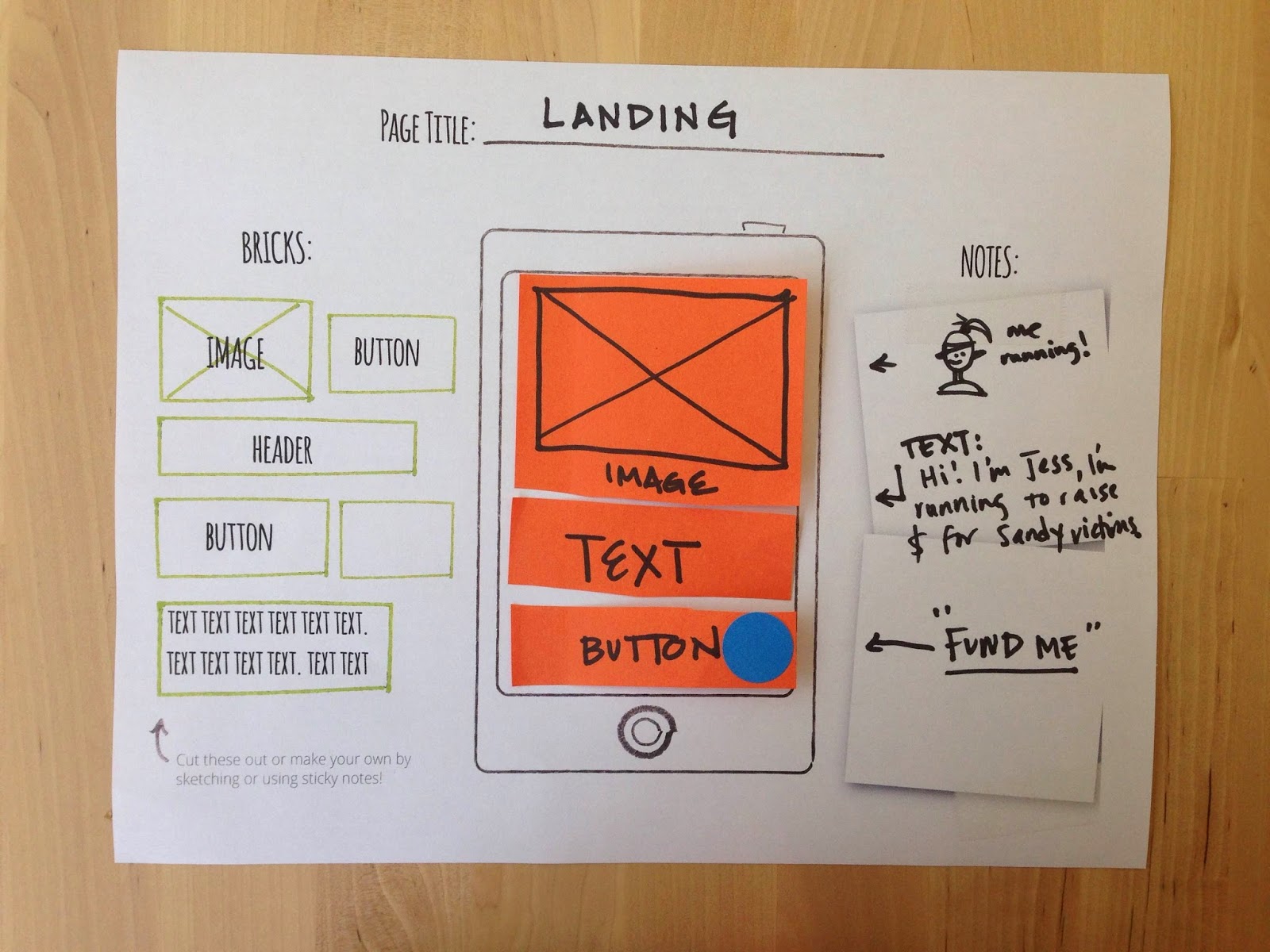
One tool that came out of this particular kit is the mobile paper prototyping template. This template (see below) is useful because it
acts as a stepping stone for learners to take their ideas, prototype
type them and eventually build them out with the Appmaker tool.
Objective: Participants will leverage their paper prototypes and use Mozilla AppMaker to create mobile apps.
With the design kit, participants user test their prototypes and are exposed to some key vocabulary and user experience design techniques. After that, there's no dancing around - this kit is all about building out mobile apps with Appmaker. Participants learn how to make apps by hacking apps.
Hacking Kit
Objective: Participants will create "brick" components for Appmaker and learn some basic coding techniques along the way.
This kit is being designed for those learners who are so invested in making apps that they want to design their own components for the Appmaker tool to use and share with the appmaking community. One tactic here for component and brick makers is to go through the exercise of designing a paper prototype of the brick and user testing that experience with potential users before hitting the ground with code.
These kits are ready to be tested out - which is another way of saying that they probably have some kinks to be worked out and refined, but we are ready and eager to here your feedback. If you have tried out the kit, have ideas or just general feedback please go here to share out your thoughts.
These kits are a collective effort from many different teams and individuals within Mozilla but I particularly want to call out Bobby, Laura and Kat for being awesome collaborators.
Subscribe to:
Posts (Atom)