Showing posts with label prototype. Show all posts

Monday, January 5, 2015

Shall we dance? On-boarding Webmakers

The first time that someone comes to your website is like a high school dance at the gym. You want that hottie who you have been thinking about all year to be attracted to you and join you on the dance floor . You want to show them what you are all about: how you aren't just about the MC Hammer pants and bikini top you are wearing (dating myself much?) - and you have the moves to prove it. This dance is just the beginning - you really want to go steady, but you have to start somewhere, right?

About 40-60% of users who sign up for a free trial of your software will use it once and then never come back.

When designing the on-boarding experience, we have a few goals: 
  • We should make a positive user experience where the visitor learns something within minutes of interacting
  • We should have the user take some action which results in signing up for a Webmaker account
  • We should give the user a clear and compelling reason to return.

Deeply inspired by the theory of Hanging Out, Messing Around and Geeking Out: Kids Living and Learning with New Media, I started to think about what a low bar way might be to get people to dance with me.  The idea is that there is a progression and/or just different ways that a site visitor might interact with the site. I wanted to create an experience for the user, that will allow them to walk away having seen a little bit of code, had the a ha! moment, the realization that there is so much to learn about the way that the web is crafted - and most importantly: that remixing the web is an approachable challenge.  According to this chart below, we could argue that most of our site visitors are at the beginning of the customer awareness journey.


Start from the beginning --- err where is that exactly?

I started by doing an exploratory sketch - asking where might users first see/ interact with the Goggles on Webmaker? I see 5 main areas of contact:
  1. Webmaker Landing Page with a very specific call to action
  2. Via the not-yet-existing "Join Webmaker" button user flow
  3. On the Tools page within Webmaker
  4. On the Goggles page within Webmaker
  5. Within the Goggles interface upon activating the bookmarklet
For this heartbeat (and the build sprint after) we decided to focus on number 1 via 2 (Join Webmaker user flow via the landing page) as the goal for the first quarter is to improve our conversion of visitors to Webmaker.org into makers.

Think through the user flow

With a clear scope, I took a stab at thinking through potential user flows (ahem,dance moves). What interactions might I be able to design that could help the user gain an understanding of the awesome potential of Webmaker and come away with learning a little bit about making things on the web within the first few minutes of their site visit? On a traditional site, this is where I would do a product tour - to tell the visitor about all the bells and whistles. But, let's remember, we are at a high school dance. We don't want to just tell that hottie about how great we are, we want them to hold our hand and dance with us. So what exactly is our dance? It's an introduction to the site through an interactive tinkering activity.

I had some experience tackling this user experience challenge a few months back when I designed the Maker Party snippet for the Firefox about page. Here, we were trying to coax visitors to the About Page to sign up for Webmaker AND ... (the cooler part) expose them to a little bit of code through modeling a playful interaction that they in turn would emulate. We found this approach to be successful. I personally user tested the page with a variety of site visitors in the Hive Learning Network and found that the animated modeling of the CSS value being typed acted as I would as a teacher in a classroom, or a friend showing someone how to approach the problem, asking the friend to try it out themselves. This approach could easily translate to an activity on the landing page where we show a visitor how to edit some playfully placed text using the X-Ray Goggles.

Approach 1: Modeling
Modeling tries to emulate the way you might teach this in a classroom environment - you show the actions that you want the learner to emulate.  See complete mockup here.


I also tackled this challenge of getting a user to dabble with new information and content in the weather activity experiment for the Hour of Code. Here, I thought about how I like to follow recipes and get feedback as I do each each step in a staged progression. (This would be like... someone teaching you how to do the macarena step by step at the dance)

Approach 2: Stage Progression
The staged progression allows the user to read, and then asks them to try it out, providing little tips along the way. See complete mockup here.


After getting some feedback from my colleagues and a few user testers I am leaning towards a hybrid approach - where you might model for them at each "step."

Next up: enticing your friend to get on the dance floor

All of the user flows and interaction designs are a good exercise, but if the icebreaker prompt isn't enticing, then it's no good.  So - I did a few iterations:


Name tag fill in the blank --- this could somehow tie in to the sign up flow.


Venn Diagrams - probably too designerdy but I couldn't help myself.


Fill in the blank - I <3 webmaking.="">


Fill in the blank - attempt 2. I like this one the most at the moment because it has a focal point, and it feels a bit disruptive, like Webmaker itself.

Next up: Finding those dancing shoes.
To get to an interactive prototype, we need to:
  • Design the hybrid interaction design (modeling + staged progression)
  • Choose a direction and then work on the UI elements
  • Wordsmith the copy.
  • User test with real humans!

Designing an on-boarding is like asking someone to the dance floor ----testing if your pits stink and all, so I would love to hear any thoughts if I've got any moves. 

Monday, August 18, 2014

Remix + Hack the Firefox Home page. No really, we want you to!

If you are a Firefox desktop user, you may have seen the Firefox default home page. This page contains a default engine web search and quick links to downloads, bookmarks, history, add-ons, sync and settings. Additionally, if you happen to have had tabs open the last time you used the browser,  you can restore them from the home page.  We often share important news and updates underneath the search bar.

Screen Shot 2014-08-15 at 10.18.04 AM.png

This is what I currently see at the Firefox default home page. Animated gifs FTW.


THE OPPORTUNITY
A few months back, Hive Labs, (a new project within the Hive Learning Networks designed to explore the question “how do we use design to transform edupunk ethics into great products?”), was approached by the Mozilla Foundation Engagement team to brainstorm how the space could be used in an innovative way to educate Firefox users about the Maker Party. Maker Party is Mozilla's global campaign to teach the web, uniting educators, organizations and enthusiastic web users with hands-on learning and making. While I have to admit, I have never really created something in the realm of owned media, I saw this as an interesting opportunity for Mozilla to show (vs. tell) what Maker Party is all about.  


THE CHALLENGE


The team (which included creative individuals from many different projects across the Mozilla Foundation and the Corporation) immediately identified the opportunity space and came up with a few project requirements:
  • use the space in an interactive way to introduce the website visitor to web literacy skills
  • acknowledge that the visitor may not have ever seen code before, and understand that we do not know what web literacy skills they are coming to this space with
  • create something playful


THE SOLUTION


While we tossed around a few different ideas, the solution that we came up with was to create a Webmaker Goggles - like experience that lets the visitor see under the hood of the webpage.


Screen Shot 2014-08-15 at 10.35.04 AM.png


After doing some initial sketches, we realized that we needed to define our learning objectives for the project.  While normally this is fairly easy to do - you say that the learner will come away with the ability to remix a paragraph written in HTML and understand what p tags are, or something very basic. Here, the challenge was two-fold: 1. the webpage visitor did not identify as a learner and 2. as I mentioned before, they might have no knowledge of the fact that the code is written in order to create a webpage. So, after several false starts, we came up with the the goal of having the website visitor walk away understanding that if you look under the hood of a webpage, you will see it is made from code.


Initial sketches for the snippet included replacing the Firefox logo with an image


After the learning objective was defined, we had to interpret what that meant in terms of interaction design. I believe that the most effective way to empower a user is to put the tools in their hands to allow them to directly address and grapple with the thing that they might learn by tinkering with it themselves. We tried out a few different iterations on this. Above is a sketch where the visitor might get instructed to remix the page from a video. The idea was to have a person in the video describe what to do, and then the learner would use the goggles to swap out the video for an image or video of their choosing. This idea was fun, and had a lot of potential community localization opportunities. However, there was a risk that the user would just not click on the video, and miss out on all the fun.


Ultimately, we ended up utilising what Atul Varma calls “cruise control” —that’s where we model the behavior in order to encourage the site visitor to try it out themselves. It looks like someone is typing out all of the words on the screen.  We decided to focus on revealing a little CSS, because you can use real words to represent colors and seeing those colors immediately can have a visceral impact on the site visitor. Here is a screencast of the interaction:


** Update: You can see the actual interactive experience by going to the Firefox homepage or if you can't get to that, check it out here.  **

The crazy and kickass cast of characters who pulled this interactive off are:  Chris Lawrence, Atul Varma, Brian Brennan , Adam Lofting, Hannah Kane, Jean Collings, Mike Kelly, Chris More, Matt Thompson, Aki Rose Braun,  David Ascher, Geoffrey MacDougall, Brett Gaylor, John Slater, Eric Petitt, Mary Ellen Muckerman, Pete Scanlon and Andrea Wood.

We’re really excited about this project, as it represents one of the first interactive uses (if not THE first) of the space of the Firefox home page. We hope that as site visitors dip their toes into understanding the craft of the Web, they’ll be inspired to learn more through Webmaker and Maker Party.  Our ultimate goal is for people to feel empowered to become creators, not just consumers, of the Web.

Monday, June 16, 2014

Mobile Design Teaching Kit

I am excited to announce that the Mobile Design Teaching Kit is up on Webmaker.org and available for testing. I have been working on this with the Appmaker and the Hive teams at Mozilla over the past month . The kit is designed for mentors to guide learners to play with, break apart and modify mobile apps in order to understand how they work as systems. This teaching kit collectively offers 12 activities that can be mixed and mashed into workshops for teens or adults who want to design mobile apps.


The kit is organized around three sets of modalities: Ideation, Design and Hacking. The thinking here is that activities could be used in workshops that take learners through everything from brainstorming an idea to, prototyping that idea and then implementing it. Additionally the kit goes from novice to expert maker in scale.

Ideation Kit
Objective: Participants will brainstorm to identify opportunities and solutions to real world problems while evaluating the appropriate platform for their design.


I have admit at that the Ideation Kit was one of my favorite kits to write because I have been teaching these design exercises for the past five years or I have gotten to a point where I realize if we combine design thinking with civic engagement projects, we can have not only more successful hack jams or maker spaces, but invested learners who are putting their skills directly into action in the communities that they are inhabiting (whether that be online or IRL).  One of the activities that I think would be particularly fun to try out is Firestarter. The goal of this activity is to get introduced to seeing your community as an inspiration for design opportunities. Participants are asked to identify design opportunities and brainstorm potential solutions. Here they will evaluate the appropriateness of their medium choice in conjunction with their opportunity space.

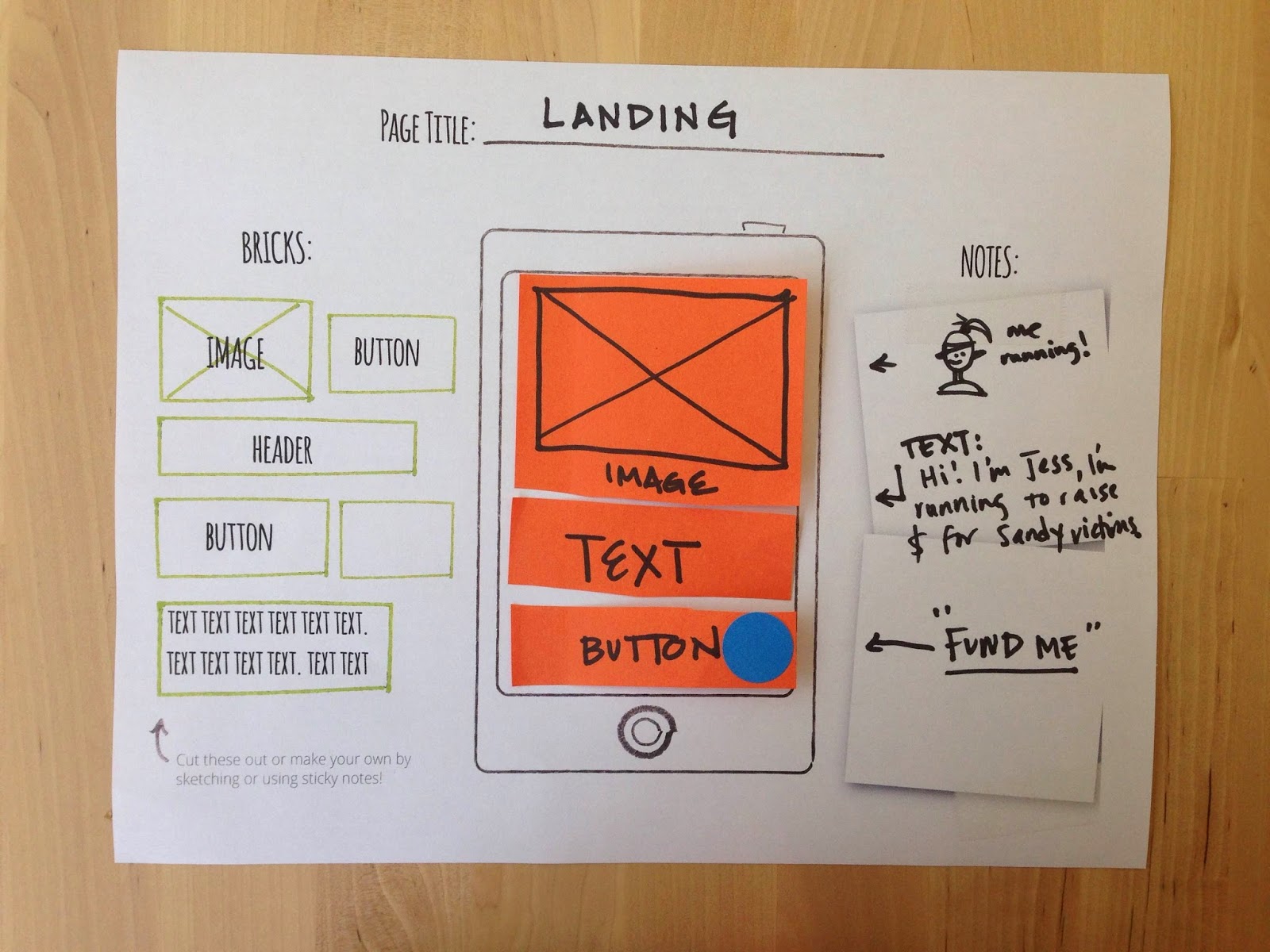
One tool that came out of this particular kit is the mobile paper prototyping template. This template (see below) is useful because it acts as a stepping stone for learners to take their ideas, prototype type them and eventually build them out with the Appmaker tool.


Design Kit
Objective: Participants will leverage their paper prototypes and use Mozilla AppMaker to create mobile apps.


With the design kit, participants user test their prototypes and are exposed to some key vocabulary and user experience design techniques. After that, there's no dancing around - this kit is all about building out mobile apps with Appmaker. Participants learn how to make apps by hacking apps.


Hacking Kit
Objective: Participants will create "brick" components for Appmaker and learn some basic coding techniques along the way.

This kit is being designed for those learners who are so invested in making apps that they want to design their own components for the Appmaker tool to use and share with the appmaking community. One tactic here for component and brick makers is to go through the exercise of designing a paper prototype of the brick and user testing that experience with potential users before hitting the ground with code.


These kits are ready to be tested out - which is another way of saying that they probably have some kinks to be worked out and refined, but we are ready and eager to here your feedback. If you have tried out the kit, have ideas or just general feedback please go here to share out your thoughts.

These kits are a collective effort from many different teams and individuals within Mozilla but I particularly want to call out BobbyLaura and Kat for being awesome collaborators.